NotebookLM changed my whole research method. This AI assistant from Google reshapes how you use documents. It produces intelligent summaries, mind maps, and flashcards, all while protecting academic integrity through its sourcing feature. For students, researchers, and content producers, this means getting work done faster without losing accuracy, a feeling that is nearly revolutionary in the existing AI world.
Key Takeaways
- NotebookLM acts like an AI research helper, arranging information from many documents, and providing citations so you can check every claim.
- The application turns passive reading into active study using a range of tools from interviews, mind maps and flashcards, to slide decks and adaptable reports.
- You can see links between ideas with mind maps and pull organized data into tables that can be sorted.
- Sourcing connects all output to the original text with colored highlights.
- Though it helps students and academics, NotebookLM has downsides like limits on source materials and possible privacy issues.
What Is NotebookLM? Understanding Google's AI-Powered Research Assistant
NotebookLM operates like an AI research companion to help you arrange, comprehend, and combine information from your files with notable speed.
Different from standard note applications, it truly understands your source files by using Google's advanced language models. A user can add PDFs, text files, youtube links, etc, and the service builds a workspace. In this space, you get answers to questions, see summaries, and find new connections. This feels like having a research partner who has read all your materials and remembers every detail.
I was most struck by a feature that tracks citations, so you always know the origin of the information. This is important for school-related honesty and dependable research. The entire system feels more dependable than other AI tools I have used.
NotebookLM Changes How You Work With Documents
The service provides very different output types for many learning approaches. It can make audio interviews for people who prefer listening and visual mind maps for those who think in concepts. You can also get custom slide decks or flashcards for remembering knowledge, all from the same files. These options, plus specific reports and video summaries, offer several viewpoints on your documents. Information is retained better than with old-fashioned note-taking.
Audio Overview
The audio summary functions like a podcast. You can generate these sound files from some or all of your sources, telling the AI what topics to cover. For instance, with quantum physics documents, you could ask for an audio explanation covering only the double-slit experiment. Or maybe one about the differences between quantum and Newtonian physics. And for a specific age group? With a few clicks and a little typing, NotebookLM will make multiple audio files from the same sources, each concentrated on different points.
Video Overview
The video summary is like the audio version, but it includes visuals for explanation. I was surprised by the quality, as the videos did not look like the strange AI productions I had anticipated. These are great when you want something explained to you, as the slides created in the video overview are excellent.
Below is a video explainer about the collapse of the Mayan Civilisation created with NotebookLM.
Mind Map
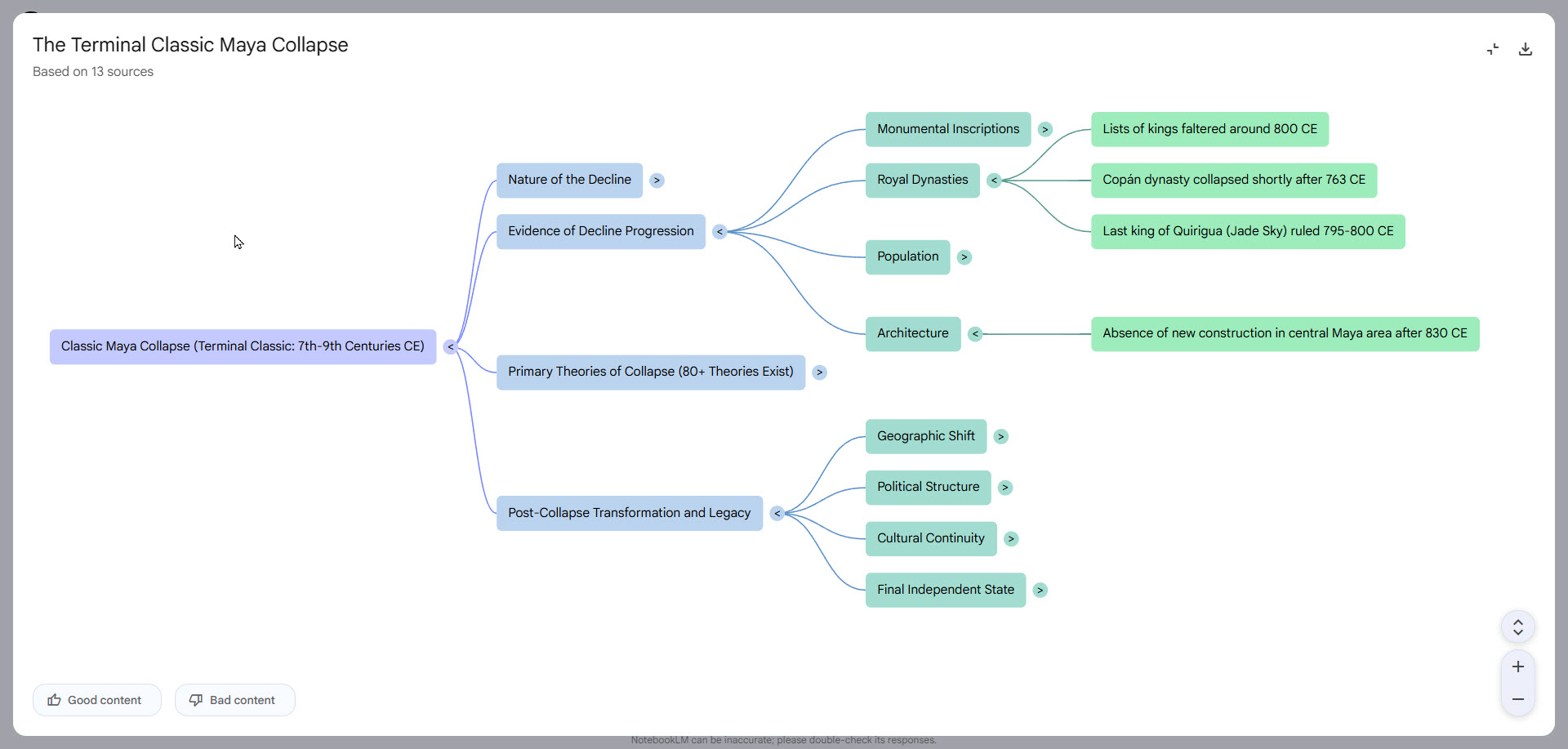
For years, I have used mind maps when I outline books, courses, or plan articles for websites. I like them because they can help organize your thoughts, or highlight concepts and connections you’ve not thought of before.
NotebookLM produces a mind map with a click of a button. Clicking any node of the mind map will open up the chatbot search looking for information in your sources on that node
Mind maps are more than just a productivity tool for writers, academics, and searching people; They’re a way to drill down into your sources and find real value.
Reports
Creating reports converts files from fixed information into useful knowledge. NotebookLM reports are like talking with your documents instead of only reading them.
There are some predefined reports: Briefing doc, Study Guide and Blog post, as well as suggested formats like Learning Handbook or Comparative assessment. But the real power of reports comes when you create your own, where you define the structure, style, tone and more. Just type in a description of what you want, and NotebookLM will use your sources to create it.
Flashcards
We’ve probably all used Flashcards at some point in our lives. Maybe when you were learning foreign vocabulary at school. NotebookLM takes main points from the files you add and makes quiz-style flashcards to test what you have learned. You can customize the topic and difficulty level and then learn at your own speed, working on weaker areas.
When the flashcard is displayed, you’ll have the question. Click the card to turn it over to see the answer. If you don’t understand the answer, click another button to get NotebookLM to explain it to you.
Quiz
Are you learning the material in your research files? The quiz function in NotebookLM can help with this. It changes passive reading to active study with custom tests made from your source documents.
- Makes special quizzes from the documents you add
- Checks your knowledge on certain ideas or the whole document
- You get feedback right away with explanations linked to the original text
These questions focus on what is in your source files, which makes remembering the information more successful.
Infographics
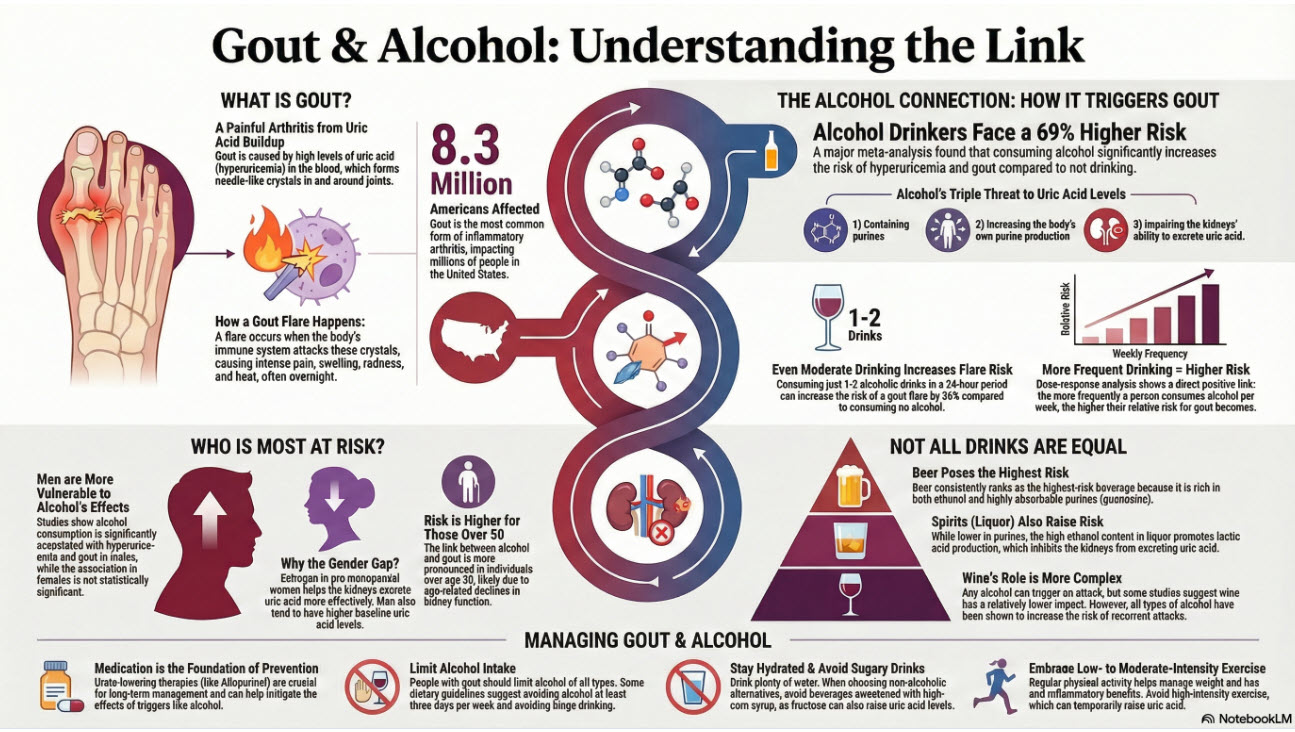
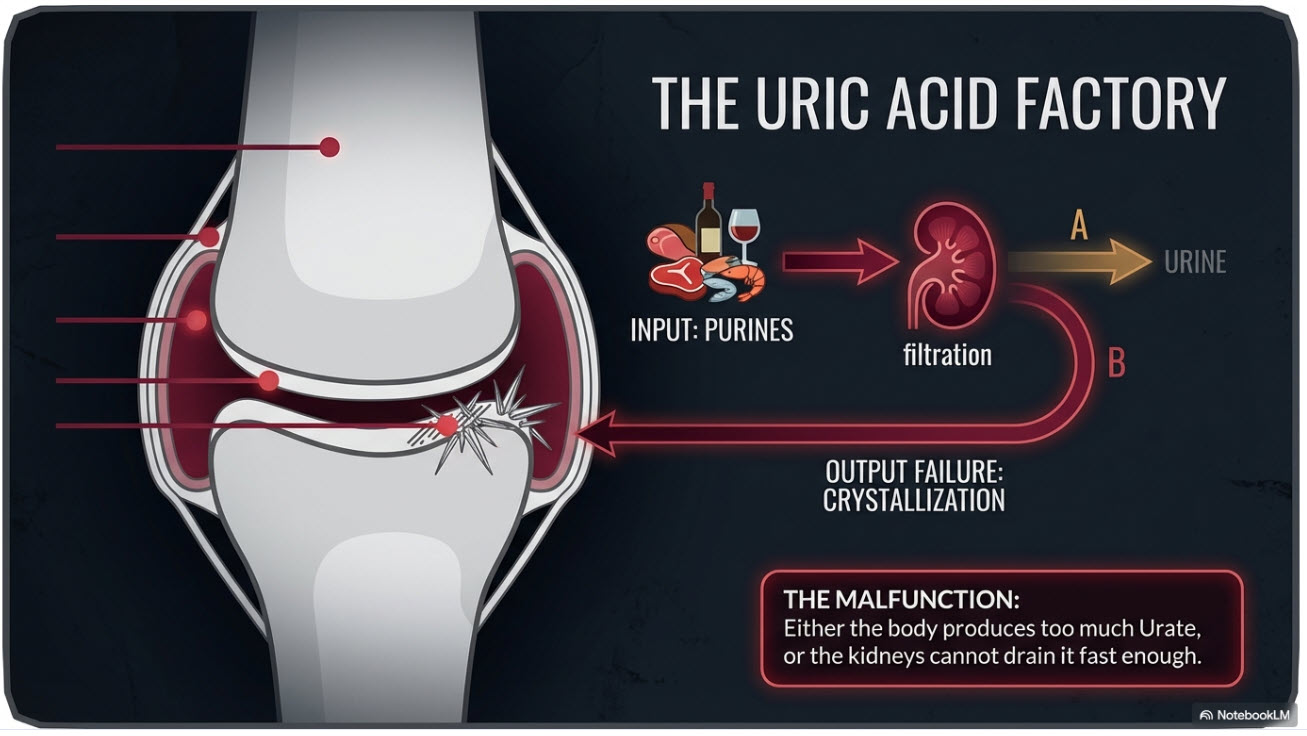
Turning difficult information into visuals seems to happen almost on its own with the infographic tool in NotebookLM. Long blocks of text become easy-to-understand, interesting graphics that show main ideas quickly. I use this function a lot when I have a lot of sources and want an overview of some aspect of those sources. You can type in descriptions of exactly what you want covered in the infographic, as well as style and detail level. These infographics are an amazing feature.


Slide Decks
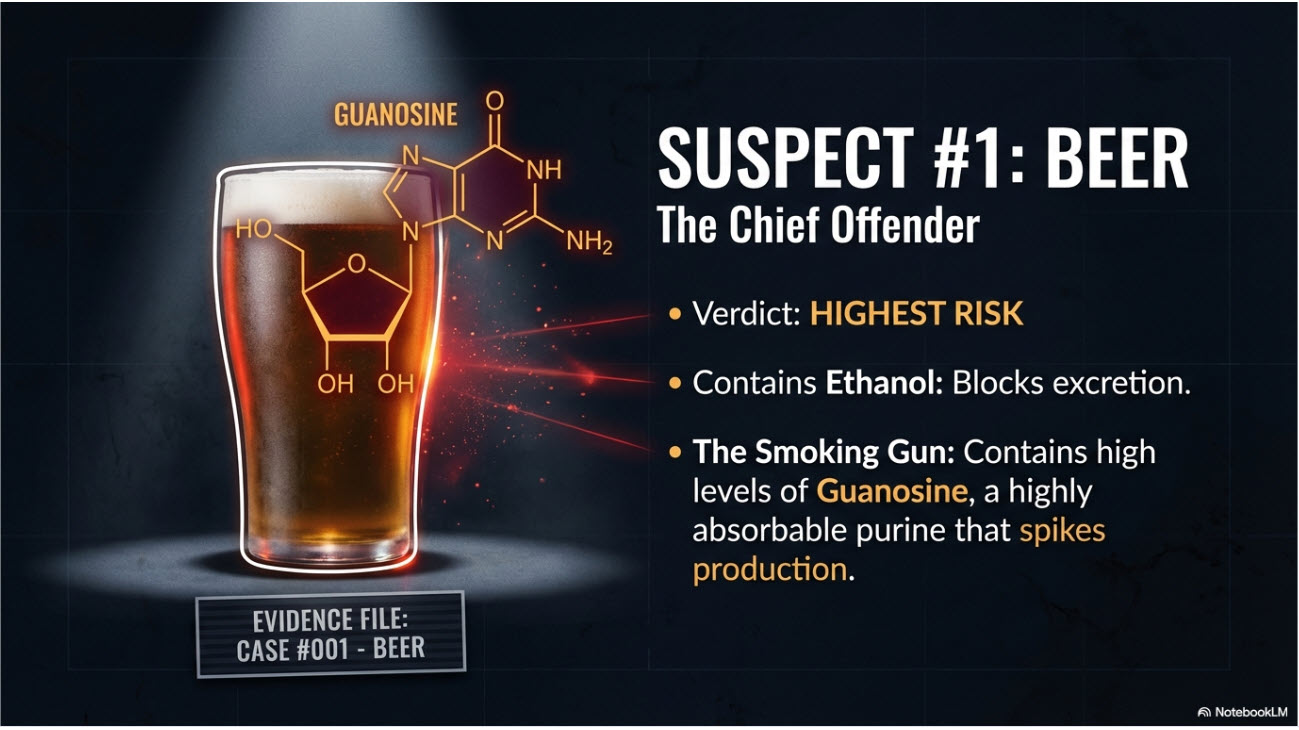
The slide deck creation in NotebookLM is incredible. I’ve used the slide decks in presentations, and also just to help learn a topic. The quality is amazing.
The slide deck features in NotebookLM are special for these reasons:
- With one click, notes become finished slides
- It pulls out key ideas but keeps the original meaning
- It makes visuals for data when that makes sense
- If there is one or more slides that aren’t quite right, you can get NotebookLM to modify just those slides by providing a little more information about what you do want.



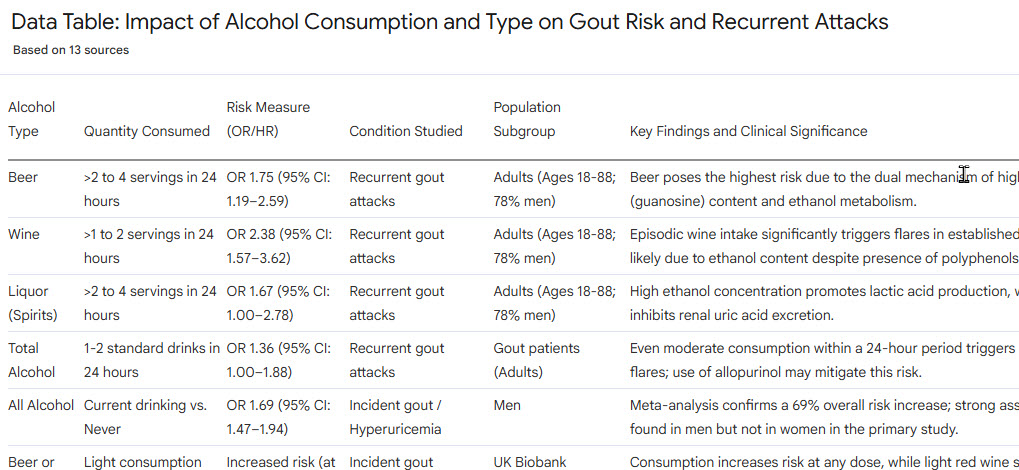
Data Tables
The data table function in NotebookLM is great if you want to summarize information in a table. The tables can be exported to Google Sheets format for further manipulation.
Just describe what you want including columns headers you need, and NotebookLM will take it from there.
Why NotebookLM Delivers More Accurate Research Insights
NotebookLM has an excellent citation system that will provide references to the exact sources of information. This keeps clear connections between the AI's output and the documents you provided, and removes “hallucinations” that are common in other AI tools.
- Every generated idea can be traced to certain parts of the uploaded files
- Colored highlights point to which sources were used for each answer
- You can check for correctness by clicking on the highlighted words to view the original text
- The program will not make a statement it cannot back up with your files
- Citations for sources show up on their own, which saves a lot of time on attribution
This strict sourcing builds dependable research. It allows you to use AI with confidence, without giving up academic honesty or correctness.
Who Should Use NotebookLM? Best Use Cases and Applications
I use NotebookLM for many tasks in my daily life, both personal and business. It just has so many uses.
- Students who are working on research papers will find it very helpful for combining sources and producing ideas that could otherwise take a long time to figure out by hand.
- University academics will appreciate its citation features giving honest sourcing while they look for links between different texts.
- Reporters putting together interview notes, writers creating scripts from background files.
- Anyone that has documents to understand.
If you are handling information from many places, for writing books, making presentations, or understanding difficult subjects, you will like how NotebookLM changes the research process.
Learn NotebookLM
If you'd like to learn NotebookLM, you can cut the learning curve by taking my course on the subject. It takes you through everything you've seen above, and more. The course runs on the Udemy platform.
You can find details by clicking the button below. This will take you to the course page on Udemy.