Practical ideas and tutorials
Articles
Browse the latest articles across WordPress, self-publishing, software, and AI tools.
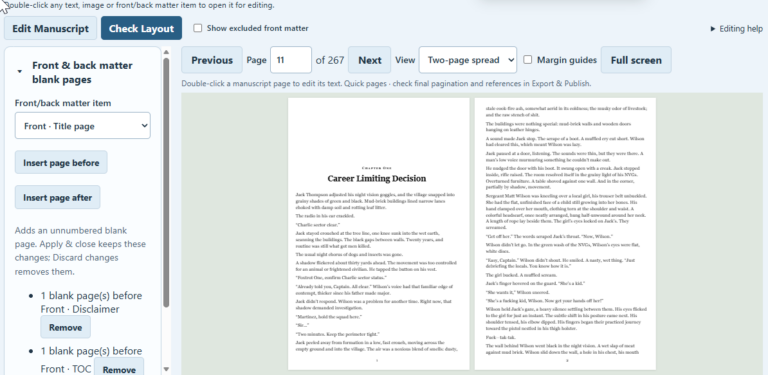
How to Prepare a Book for Amazon KDP with KDP Formatter
Follow the video and a practical checklist to import, format, preview, and export your Kindle or print book with KDP Formatter.
Read article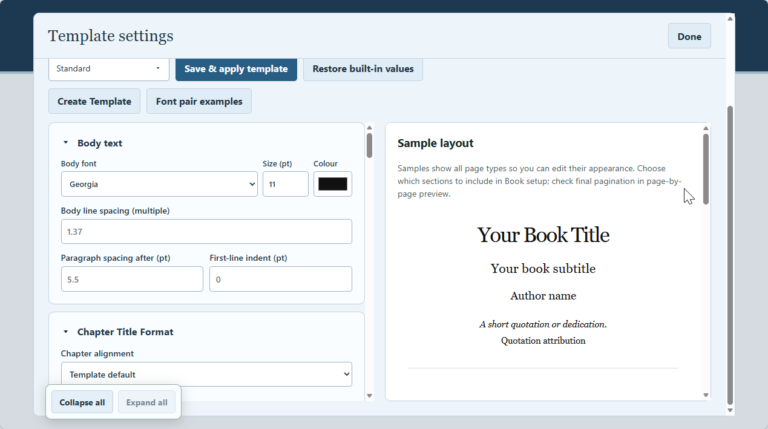
Book Formatting Templates
Build a book formatting template from a sample chapter and reuse your fonts, spacing, and chapter styles across future titles.
Read article
Easy Grammar 101 – Your Foundation for Better English
Refresh the grammar foundations behind clearer English sentences. The course introduces the parts of speech and different clause types, using lessons and self-assessment activities to connect terminology with more confident writing and communication.
Read article
Convert HTML to WordPress
Move an older static HTML website into WordPress with a planned content and URL migration. The course follows the conversion process from mapping the existing site to rebuilding pages, redirecting addresses and checking the finished result.
Read article
CSS for Beginners
Learn the CSS basics used to change how web pages look. The course introduces syntax, selectors, colours and typography before explaining the box model and practical ways to experiment with a site's styles.
Read article
SEO Primer – Search Engine Optimization for Beginners
Get an introduction to SEO with an emphasis on how to evaluate techniques. The course introduces content, ranking considerations and the distinction between safer practices and risky shortcuts, providing a framework for further learning.
Read article
Learn How to Move a WordPress Website
Plan and carry out a WordPress move between hosts or domains. The course explains why both files and the database matter, how to reconnect the installation, and what to test after the move.
Read article
Installing WordPress – Installation, Registrars & Hosting
Learn the difference between a domain registrar, a hosting service and WordPress itself. The course walks through installation and the first content and customisation steps, making it a starting point for a new website owner.
Read article
Install WordPress Locally
Set up WordPress on your own computer so you can practise without paying for a web-hosting account. The course also introduces installing themes and plugins and adjusting the local environment when larger uploads are needed.
Read article
How to Write Great Web Content
Create website content around the questions and vocabulary of its subject. The course combines content ideas, research and writing with quality checks, explaining how to move beyond repeated keywords towards more useful coverage.
Read article
Teach Online – Become a Udemy Instructor
Plan, record and prepare an online course for Udemy. This unofficial course covers the production workflow, including screen recordings, lesson structure and editing, alongside publishing, pricing and promotion considerations.
Read article
Learn how to Create High Quality Affiliate Websites
Build an affiliate website with attention to content quality and how visitors encounter recommended products. The course introduces the affiliate model and demonstrates ways of presenting products and directing interested visitors to a merchant.
Read article
WordPress Security – How To Stop Hackers
Learn how everyday choices affect the security of a WordPress website. The course explains common attacks and walks through protective settings, including how to reuse a configuration across sites and investigate attempted attacks.
Read article
WordPress Backup & Restore
Understand what needs backing up in a WordPress website and practise restoring it. The course covers files and the database, automated backups and off-site storage, keeping the focus on recovery rather than simply creating backup files.
Read article
Amazon Self-Publishing for Beginners
Follow the process of preparing and publishing books through Amazon. The course covers researching an idea, formatting the manuscript and publishing Kindle and paperback versions, then introduces Amazon's promotional tools.
Read article
Best WordPress Plugins
Explore plugins that extend WordPress with practical features. The course explains how to install and configure a selection covering site administration and visitor-facing functions, as well as how to look for tools that suit a particular need.
Read article
WordPress Skills : Adding a Forum
Add a discussion forum to an existing WordPress website using plugins. The course focuses on setup, access permissions and everyday administration so you can understand both the visitor experience and the controls behind it.
Read article
HTTP to HTTPS – Convert your WordPress Site – Complete Guide
Move a WordPress website from HTTP to HTTPS and check the result. The course explains SSL, available hosting options and redirects, with attention to mixed-content problems and securing the WordPress login area.
Read article
Essential Webmaster Skills
Learn the practical administration tasks involved in running a website. The course covers domains, hosting, files and email, then introduces tools for monitoring a site and managing the services that support it.
Read article
Structured Data & Schema for Webmasters
Understand structured data and the role schema markup plays in describing web content. The course explores manual markup, Google Tag Manager and WordPress plugins, helping you compare implementation approaches rather than rely on one tool.
Read article
WordPress Intermediate Skills
Go beyond routine WordPress publishing and explore the structure and administration of a website. The course brings together themes, templates, redirects, performance, user roles and staging to help existing users take more informed control of their sites.
Read article
SEO – Search Engine Optimization for 2020
Develop an SEO approach built around useful content, clear site organisation and sensible evaluation of tactics. The course combines keyword research and on-page work with internal linking, authority and a practical site-audit process.
Read article
Learn Elementor
Use Elementor to build WordPress pages and, with the relevant Pro tools, work on wider theme layouts. The course covers design foundations, reusable templates and responsive checks, while distinguishing the free and paid feature sets.
Read article
Learn PowerPoint
Learn to create and deliver PowerPoint presentations that communicate clearly. The course combines interface skills with slide design, working with text and visuals, and using transitions, animation and presenter tools with a purpose.
Read article

