What Is a User Role in WordPress?
Learn how to assign user roles for teams working on WordPress blogs and websites. Understand permission controls, what each role means, and who should have access to what?


Learn how to assign user roles for teams working on WordPress blogs and websites. Understand permission controls, what each role means, and who should have access to what?

This guide explains what a Content Management System (CMS) is in laymen’s terms. It uses WordPress CMS to illustrate and highlights other popular CMS, all of which offer something unique.

You can add any widget to a post or page, using a simple Wordpress plugin.
Adding categories and sub-categories in WordPress is a simple task. It makes managing posts easier for webmasters. Your SEO-friendly categories also improve the visitor’s experience.

You don’t have to settle for WordPress built-in or theme-dependent fonts. This guide shows how to make your WordPress blog or website stand out using custom fonts.

Not every webmaster is a fan of the newer WordPress Gutenberg Editor. This tutorial shows you how to easily disable it and revert to the Classic editor from the WP Dashboard.
Read this quick quite on the 3 ways to create and install a custom favicon in WordPress. Websites with favicons look more professional, enhance the site’s reputation, and have higher trust levels.

What is a static front page? Why should business, portfolio, and non-profit site owners consider one? This tutorial shows how to create an impressive WordPress homepage.

Learn about WordPress shortcode and how it puts the power of coding into the hands of every site owner. No Skills Needed! It’s a fast, immediate, and cool way to add dynamic website features.
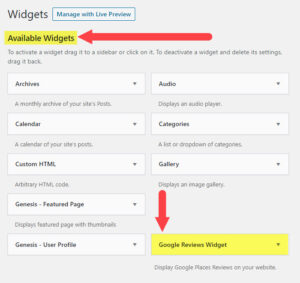
A walk-through how-to guide that explains what widgets are in WordPress. Learn how widgets benefit your WordPress personal blog or website.
Bestselling Course